Tax declaration season is upon us, while property owners may also need to complete a property tax declaration. The first step is to create a French tax account – here’s how to do that.
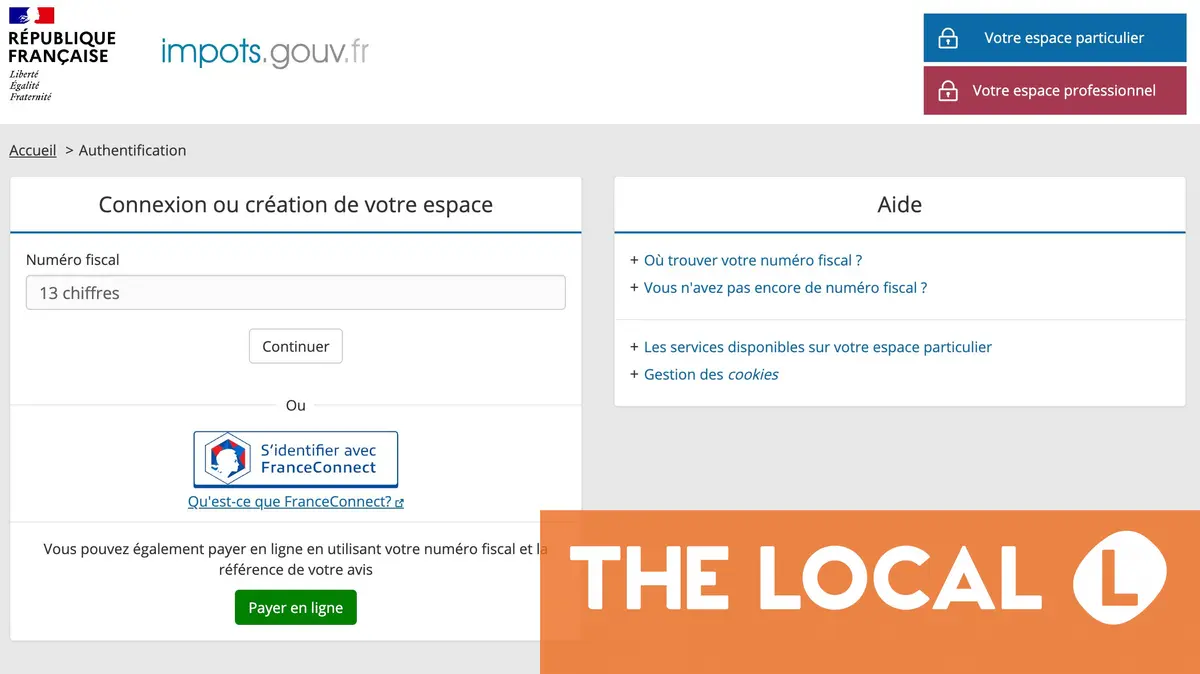
The French tax website Impots.Gouv.Fr is where you file your annual tax declaration and where property owners must make their property tax declaration.
If you’re a new arrival in France you will need to create an account in order to file your compulsory annual declaration, while if you own French property – including second-home owners – you will need an online account in order to complete the déclaration d’occupation, also known as the déclaration des biens immobiliers.
French property tax declaration – your questions answered
Whichever group you fall into, you will need to set up an online account for yourself – here’s how to go about this.
Do you have a tax number?
If you have previously filed taxes in France, your tax number (numéro fiscal) is likely already included on the paper copy of your bill. It is a 13-digit number that appears at the top of the first page of your last tax return or bill.
You should be able to log in using the numéro fiscal that you already have. Head to impots.gouv.fr and then click on the blue box in the top right hand corner ‘Votre espace particulier‘.
If you’re logging in for the first time you may get a request to verify your ID. There are a number of different ways to do this, either online or in-person at the tax office – find more information on verifying your ID.
Don’t have a tax number
If you don’t have a numéro fiscal, then the first step is to request one since you cannot create an account without the number.
The process to do this is slightly different depending on whether you live in France or not. Let’s look at non-residents first.
Non-residents
Step 1
You will need to upload a copy of an identity document, so have ready on your computer/ tablet/ phone a photo or scan of your passport.
Step 2
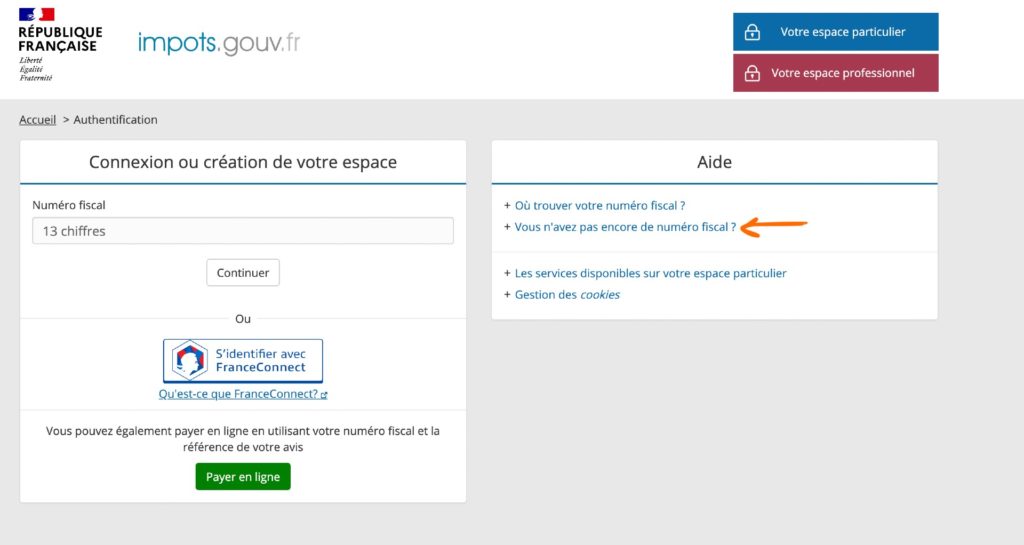
Go to Impots.Gouv.Fr website, click “Votre espace particulier” in the upper right hand corner.
This will take you to the page shown above. If you do not have a numéro fiscal, you will click “Vous n’avez pas encore de numéro fiscal?” (Don’t have a tax number yet?) on the right of the page.
Step 3
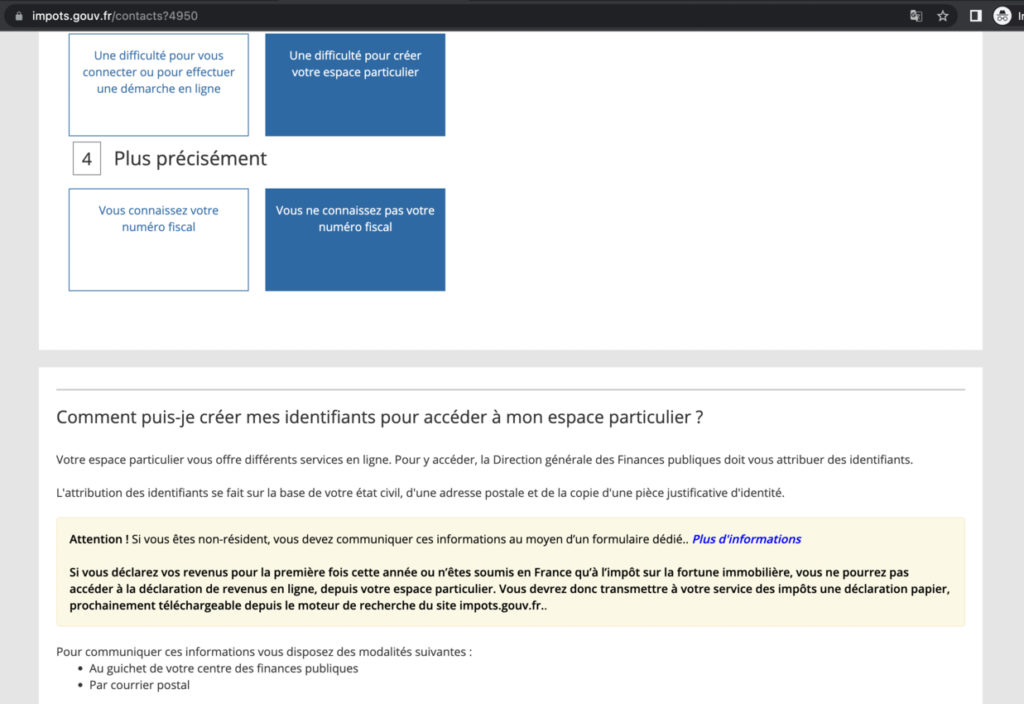 Screenshot by The Local of Impots.Gouv.Fr
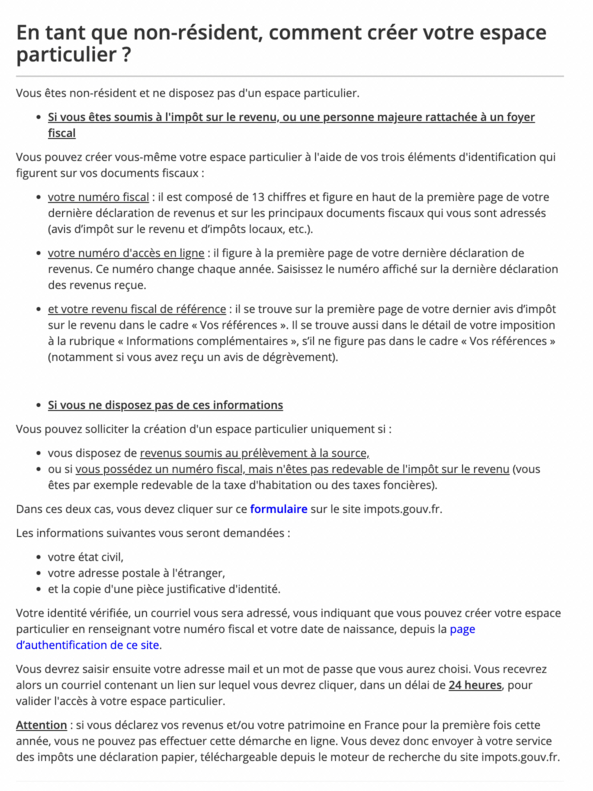
You should be taken to the screen above. It offers an explanation for how to create login details to access the personal space. First, it says that you will need to identify yourself based on your marital status, postal address, and with an identity document.
If, however, France is not your main home – for example you own a second-home in France but live elsewhere – you need a separate form.
In the yellow box you will see the line ‘Attention – Si vous êtes non-résident, vous devez communiquer ces informations au moyen d’un formulaire dédié – Plus d’informations‘
Click the link for “Plus d’informations” and it will take you to the section for non-residents.
You may also be able to access the non-residents form directly HERE.
Step 4
 Screenshot by The Local of Impots.Gouv.Fr
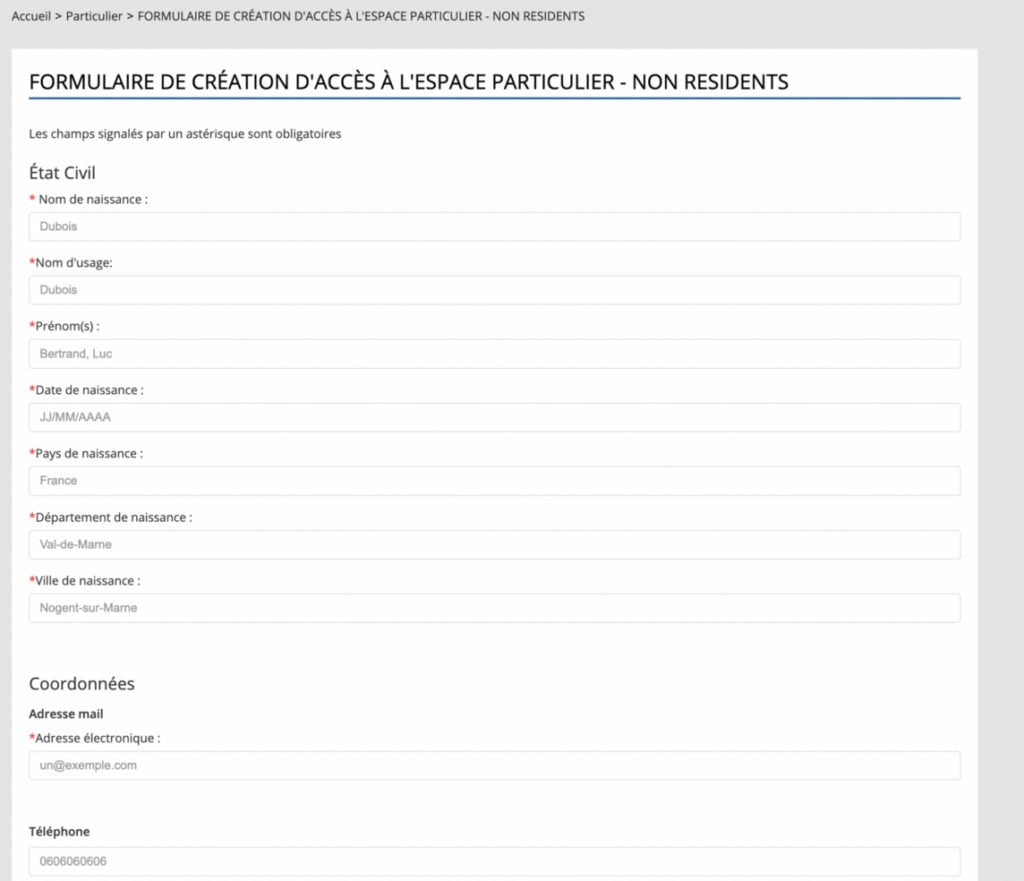
Scroll down to where it says ‘Si vous ne desposez pas de ces informations’ and then click on ‘formulaire‘ in blue. This will take you to the form shown below.
 Screenshot by The Local of Impots.Gouv.Fr
You will then need to fill out your name plus your date, country and place of birth, and email address and click ‘continuer‘. If you don’t have a French phone number, you can leave the phone number box empty.
What’s in a name? Understanding how to fill out French forms
Step 5
Once you have pressed continue, the next screen will show all of your information compiled into the correct format – you copy that off the screen and then paste it into an email.
The next step is to attach proof of ID to the email – this can be a photo or scan of a valid national ID card or passport. If you’re using an ID card, make sure you attach pictures or scans of both sides of the card.
Finally, address your email to this address – dinr.servicesenligne@dgfip.finances.gouv.fr – and press send.
Once sent, you should receive an automated confirmation email – if you don’t get this within 48 hours, check your spam or junk folder.
Step 6
Wait. You won’t get the number immediately and when it does arrive it will be via email.
Recent reports suggest that some people are getting the number in just a few days, but waiting times vary and up to 12 weeks is not unusual, especially once tax declaration season opens and services become busier.
Step 7
Congratulations, you have your numéro fiscale, the next step is to set up your online account on the Impots site.
Head to impots.gouv.fr and click Votre espace particulier in the top right of the screen
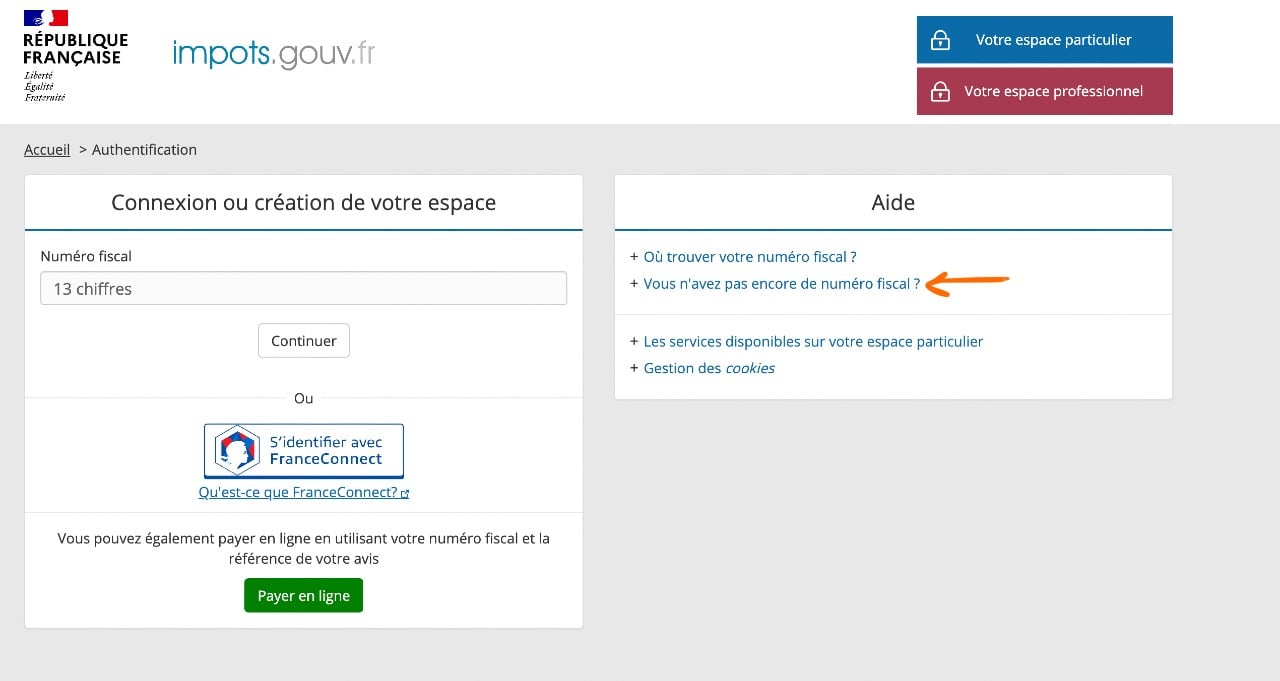
This brings you to the above site, and you can enter your numéro fiscal in the box on the left.
If you are setting up your account for the first time, you will need to fill in some personal details and create a password.
Once the account is set up, you can log in at any time using these details, or use France Connect for easier access.
Resident in France
If you are resident in France the process is slightly different, and the online form option no longer exists.
There are two ways to request your tax number; in person at your local tax office or by post. Some tax offices will accept requests via email but this is not the case everywhere.
Regardless of how you do it, you will need ID (a passport or valid national ID card) and will need to provide personal details like your name, address, date of birth and contact details.
In person – probably the easiest way to do this is in person. You can visit your local tax office without an appointment and request your tax number – full details on finding your local tax office here.
Remember to take your passport with you. Some tax offices hand the numbers out on the spot, others send them later via post.
By post – you can also make your request by post. You will need to write a letter (in French) explaining that you are requesting a tax number and you will need to include the following information; Full name, address, date of birth, country and place of birth, email address, phone number. You will also need to include a colour photocopy of your passport.
It’s a good idea to send the letter via registered mail (lettre recommandé).
By email – not all tax offices accept queries by email, but some do. You can write to them as described in the letter format above, attaching to the email a scan of your passport.
You can find the email by first finding your local tax office (search Centre des finances publiques plus the name of your commune) then Googling the name of the tax office (it will usually be SIP + the name of a commune) and ‘adresse mail’. The usual format for tax office email addresses is to end @dgfip.finances.gouv.fr
Income tax declaration
If you live in France or have income here, then you will need to complete the annual income tax declaration.
Declarations open on April 9th in 2026 – find full details here.
In previous years, people making their first declaration have had to declare on paper, the government has said that it is working on making it possible to make a first declaration online, but messaging on the tax website suggests that this is not possible yet.
You can obtain a paper form to make the declaration from your local tax office.
Property tax declaration
If you own property in France then will also need to complete the déclaration d’occupation (if you haven’t already).
If you need to complete this property tax declaration then we have some good news – you’ve already done the hard part by creating the account, the declaration itself is relatively straightforward. Here’s how to complete it.
If you need help, you can call the tax hotline on 0 809 401 401, visit your local tax office (search Centre des finances publiques plus the name of your commune to find your local office) or select the ‘Contact et RDV’ section on the tax website.